How to Plan Professional Photography for Your Small Business Website: A Step-by-Step Guide


Tired of Stale, Generic Photos on Your Website?
If you’ve ever felt that your website hardly stands out, you’re not alone. Many small business owners try to cut corners with stock images or hasty smartphone snaps, only to end up with visuals that don’t truly represent their brand. Quality photography for website images can make all the difference in communicating what sets your small business apart.
Why Photography for Website Images is Crucial for Small Businesses
Your website is often a potential client’s first impression. In today’s visually driven online world, every image is a chance to communicate your values, personality, and professionalism. Effective photography for website images for small business goes beyond just "nice" pictures – it’s about creating real connection and trust online. As more SMEs update their websites post-pandemic, personalised and strategic visuals are becoming a clear point of differentiation.
Step-by-Step Guide to Planning Website Photography That Works
Step 1: Define Your Brand Story and Website Goals
Before you even pick up a camera, clarify the story you want your website to tell. Which aspects of your business should shine through? For Ellie’s School for Dogs, our aim was playful, approachable energy — we wanted site visitors to feel the joy and quirkiness that set Ellie apart from bigger chains.
Tip: Make a list of words that describe your business personality (e.g., welcoming, innovative, expert). Share these with your photographer — they’ll guide everything from styling to composition.
Step 2: Identify Where Images Will Sit on Your Website
Group your needs into core website sections:
Hero images: These large banner photos instantly say who you are.
About/team pages: Candid, approachable portraits build trust.
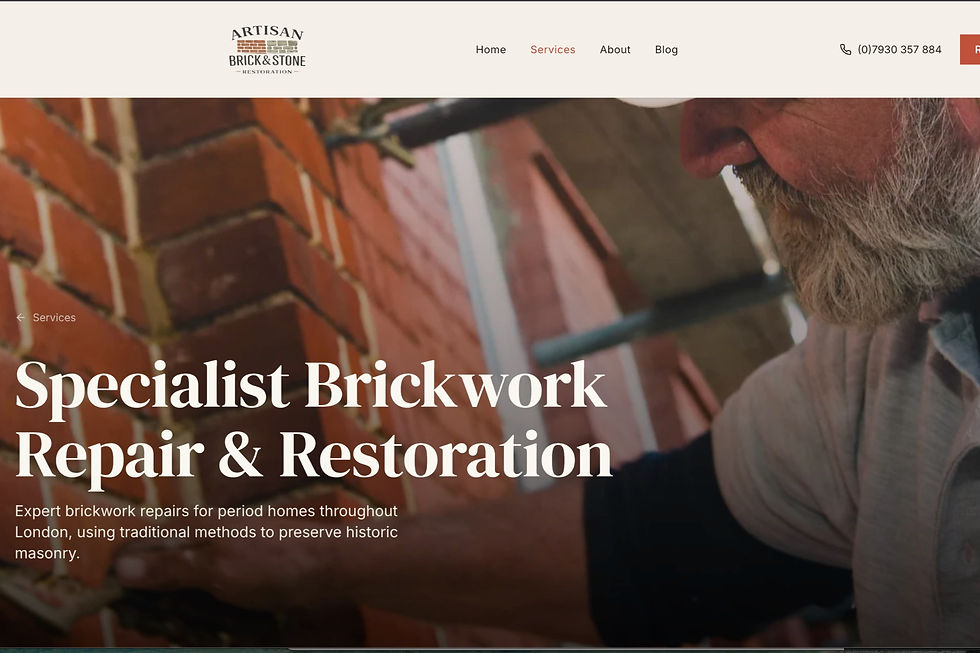
Service/product galleries: Show your process, workspace, or specific expertise (like the artisan bricklayers we photographed working at height for Artisan Brick & Stone Renovation).
Testimonials/case studies: Images of you with real clients, or your products in action, add authenticity that stock images can’t.
Step 3: Develop a Custom Shot List
A personalised shot list saves time and ensures you don’t miss priority shots. As part of every session, we break this down based on your content plan.
Example: For the innovative tech company founded by two brothers, our shot list included classic headshots for bios, collaborative shots with their AI hardware, and more casual moments reflecting their friendly rapport. This enriched both their About page and press kit.
Step 4: Prepare Your People and Your Space
Let your team (or solo self) know what to expect — nobody likes feeling awkward! Part of our consultative approach is walk-throughs to assess light, suggest clothing that fits your brand palette, and create a relaxed atmosphere. If you’re shooting on location (like the scaffolding for specialist brickwork), a pre-shoot safety check and a tidy workspace are essential.
Tip: Avoid all-white or overly busy outfits. Instead, opt for simple, solid colours that align with your branding.
Step 5: Consider Lighting, Style, and Consistency
Natural light is flattering, but we also plan for overcast days or tricky indoor spaces. Consistent editing style (contrasty, bright, muted etc.) is just as important. We advise clients to decide on a look that will stay fresh, align with their logo/colours, and feel authentic — not trend-driven.
Step 6: Show Real Stories and Action
Stock images fail because they feel generic. Capture genuine interactions: a craftsman at work, a client consultation, a team in discussion. At the Dartmouth House fashion event, candid behind-the-scenes shots made the website gallery come alive — far more engaging than stiff posed line-ups.
Step 7: Plan for Ongoing Updates
Websites evolve quickly. We always recommend capturing a bank of versatile images during each session — not just what you need right now. This lets you update your blog, showcase new hires, or highlight case studies without clashing with your overall visual strategy.
What Makes My Approach Work: Trusted by Real Small Businesses
I'm proud of my extensive background in film, marketing, and PR – it means I know every image must support your broader brand goals, not just look pretty. My process combines visual strategy expertise with a tailored, consultative shoot, putting people at ease and translating your business’s core qualities into compelling visuals. Authentic websites like Ellie’s School for Dogs and Artisan Brick & Stone Renovation have seen stronger engagement and more heartfelt responses from their customers thanks to strategic, bespoke imagery.
Frequently Asked Questions
What are the best types of images for a small business website?
Website hero images, genuine team portraits, and candid shots of your workspace or services in action work best. Avoid stock photography for key sections.
How is professional website photography different from stock photos?
Professional website photography is tailored to your brand, your people, and your story. Stock photos look generic and can undermine trust.
How far in advance should I book a website photography session?
Ideally, book 3-4 weeks in advance to allow for in-depth consultation, planning, and weather contingencies.
Do I need to hire a stylist or can you advise on outfits?
I advise all clients on clothing that fits your branding and style. Specialist stylists are rarely needed for small business website photography.
How much does website imagery photography cost?
Pricing varies by session length and requirements, but investing in a personalised shoot delivers better results and ROI than spending on generic content.
Ready to Plan Your Own Website Photography Session?
If you want your website to truly represent what makes your business special, let’s work together to create images that do just that. Contact us to book a discovery call or explore our branding photography services for small businesses — no obligation, just friendly, expert advice.


Comments